
Description
Course Name: Certificate in GUI-Based Operating System in Computer
Course Id: CGBOSC/Q0001.
Eligibility: 10th Grade (high school) or Equivalent.
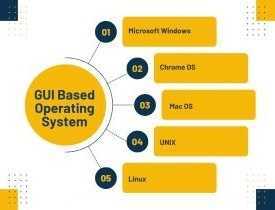
Objective: The Certificate in GUI-Based Operating System in Computer course is designed to introduce individuals to operating systems (OS) that use a Graphical User Interface (GUI). GUI-based operating systems allow users to interact with their computers using visual elements such as icons, buttons, windows, and menus, making it easier to navigate and use the system compared to command-line interfaces. This course covers key concepts and hands-on training in popular GUI-based operating systems like Microsoft Windows, macOS, and Linux (with graphical desktop environments).
Duration: Two Month.
 How to Enroll and Get Certified in Your Chosen Course:
Step 1: Choose the course you wish to get certified in.
Step 2: Click on the “Enroll Now” button.
Step 3: Proceed with the enrollment process.
Step 4: Enter your billing details and continue to course fee payment.
Step 5: You will be redirected to the payment gateway. Pay the course and exam fee using one of the following methods:
Debit/Credit Card, Wallet, Paytm, Net Banking, UPI, or Google Pay.
Step 6: After successful payment, you will receive your study material login ID and password via email within 48 hours of fee payment.
Step 7: Once you complete the course, take the online examination.
Step 8: Upon passing the examination, you will receive:
• A soft copy (scanned) of your certificate via email within 7 days of examination.
• A hard copy (original with official seal and signature) sent to your address within 45 day of declaration of result.
Step 9: After certification, you will be offered job opportunities aligned with your area of interest.
Online Examination Detail:
Duration- 60 minutes.
No. of Questions- 30. (Multiple Choice Questions).
Maximum Marks- 100, Passing Marks- 40%.
There is no negative marking in this module.
| Marking System: | ||||||
| S.No. | No. of Questions | Marks Each Question | Total Marks | |||
| 1 | 10 | 5 | 50 | |||
| 2 | 5 | 4 | 20 | |||
| 3 | 5 | 3 | 15 | |||
| 4 | 5 | 2 | 10 | |||
| 5 | 5 | 1 | 5 | |||
| 30 | 100 | |||||
| How Students will be Graded: | ||||||
| S.No. | Marks | Grade | ||||
| 1 | 91-100 | O (Outstanding) | ||||
| 2 | 81-90 | A+ (Excellent) | ||||
| 3 | 71-80 | A (Very Good) | ||||
| 4 | 61-70 | B (Good) | ||||
| 5 | 51-60 | C (Average) | ||||
| 6 | 40-50 | P (Pass) | ||||
| 7 | 0-40 | F (Fail) | ||||
Key Benefits of Certification- Earning a professional certification not only validates your skills but also enhances your employability. Here are the major benefits you gain:
Practical, Job-Ready Skills – Our certifications are designed to equip you with real-world, hands-on skills that match current industry demands — helping you become employment-ready from day one.
Lifetime Validity – Your certification is valid for a lifetime — no renewals or expirations. It serves as a permanent proof of your skills and training.
Lifetime Certificate Verification – Employers and institutions can verify your certification anytime through a secure and reliable verification system — adding credibility to your qualifications.
Industry-Aligned Certification –All certifications are developed in consultation with industry experts to ensure that what you learn is current, relevant, and aligned with market needs.
Preferred by Employers – Candidates from ISO-certified institutes are often prioritized by recruiters due to their exposure to standardized, high-quality training.
Free Job Assistance Based on Your Career Interests – Receive personalized job assistance and career guidance in your preferred domain, helping you land the right role faster.
Syllabus
Introduction to Operating Systems: Definition and Functions of an Operating System, Types of Operating Systems (Batch, Time-Sharing, Distributed, Real-Time, GUI-Based), Evolution of GUI-Based Operating Systems, Features of GUI-Based OS, Role of OS in System Management, Introduction to Multitasking and Multi-User Systems, Kernel, Shell, and File Systems, Comparison Between GUI and CLI-Based OS, Commonly Used GUI-Based Operating Systems (Windows, macOS, Linux with GUI).
Understanding Graphical User Interface (GUI): Definition and Components of GUI, Elements of GUI-Based OS (Windows, Icons, Menus, Pointers), Advantages of GUI Over CLI, Interaction Methods (Mouse, Touch, Voice Commands), Customizing the Desktop and Taskbar, Working with Files and Folders Using GUI, GUI-Based Accessibility Features, Virtual Desktops and Multiple Workspaces, Common GUI Issues and Troubleshooting, Evolution of GUI in Modern OS.
Windows Operating System Fundamentals: Introduction to Windows OS, Features of Different Windows Versions, Start Menu and Taskbar Navigation, File Explorer and File Management, Control Panel and Settings, Managing User Accounts and Permissions, Installing and Uninstalling Applications, Using Windows Search and Cortana, System Performance Monitoring, Introduction to Windows Security Features.
macOS Operating System Fundamentals: Overview of macOS and Its Features, macOS Desktop and Dock, Finder and File Organization, System Preferences and Customization, Using Spotlight for Search, Managing Applications and Utilities, Multi-Touch Gestures and Shortcuts, Security and Privacy Settings, iCloud and Online Backup, Troubleshooting macOS Issues.
Linux GUI-Based Operating Systems: Introduction to Linux GUI (Ubuntu, Fedora, Linux Mint), Differences Between Linux CLI and GUI, Popular Linux Desktop Environments (GNOME, KDE, Xfce), Navigating Linux File System Using GUI, Installing and Managing Applications via GUI, Customizing Linux Desktop, Managing Users and Permissions in GUI, Terminal vs. GUI in Linux, Linux Security and Software Updates, Common Linux GUI Issues and Fixes.
File and Disk Management in GUI-Based OS: Understanding File Systems (NTFS, FAT32, ext4, HFS+), Creating and Managing Files and Folders, Using GUI-Based Disk Cleanup and Optimization Tools, Partitioning and Formatting Drives, File Compression and Extraction, Working with External Storage Devices, Cloud Storage and File Synchronization, Searching and Organizing Files Efficiently, Backup and Recovery Options, File Sharing and Networking in GUI.
Job Opportunities after completion of Certificate in GUI-Based Operating System in Computer course:
Graduates of the Certificate in GUI-Based Operating System in Computer program gain proficiency in graphical user interfaces (GUIs) and learn to navigate and manage operating systems like Windows, macOS, and Linux with ease. This foundational knowledge opens up a wide range of career opportunities in IT support, system administration, tech support, and other computer-related fields. Below are detailed career options along with potential salary ranges for graduates in India:
1. System Administrator
Role: Manage and maintain computer systems, networks, and servers that rely on GUI-based operating systems. They ensure the proper functioning, security, and performance of the systems within an organization. Salary Range: ₹4,00,000 – ₹8,00,000 per year (can increase with experience and expertise)
2. IT Support Technician
Role: Provide technical support to users, help with troubleshooting operating system-related issues, and assist in system installations, updates, and configurations. They work with GUI-based systems like Windows or macOS. Salary Range: ₹2,50,000 – ₹6,00,000 per year (varies by experience)
3. Desktop Support Engineer
Role: Provide support to end-users for issues related to their desktop operating systems, such as Windows or macOS. This role includes hardware troubleshooting, software installations, and maintaining the user environment. Salary Range: ₹3,00,000 – ₹6,00,000 per year
4. Technical Support Engineer
Role: Assist clients or customers with technical issues, focusing on GUI-based operating systems. They provide troubleshooting, configuration assistance, and support for users facing software or system-related problems. Salary Range: ₹3,00,000 – ₹7,00,000 per year
5. Help Desk Support Technician
Role: Provide first-line support for users having issues with their computer systems, primarily focusing on troubleshooting operating system problems, software installations, and configuring settings on GUI-based OS. Salary Range: ₹2,50,000 – ₹5,00,000 per year
6. Network Administrator (with GUI Expertise)
Role: Manage network infrastructures and systems that use GUI-based operating systems. This includes setting up, configuring, and maintaining network hardware and software. Salary Range: ₹4,50,000 – ₹9,00,000 per year
7. Software Tester (GUI Testing)
Role: Test and evaluate software applications that run on GUI-based operating systems. The focus is on ensuring usability, functionality, and performance of the user interface across different platforms like Windows or macOS. Salary Range: ₹3,50,000 – ₹7,00,000 per year
8. PC Technician
Role: Specialize in the installation, maintenance, and repair of desktop computers, ensuring that the operating system is properly installed and functioning. They are also responsible for the setup and configuration of GUI-based operating systems. Salary Range: ₹2,50,000 – ₹5,00,000 per year
9. IT Trainer (GUI-based OS)
Role: Teach individuals or corporate teams how to use and navigate GUI-based operating systems such as Windows, macOS, and Linux. This role involves preparing educational content and providing hands-on training. Salary Range: ₹3,00,000 – ₹7,00,000 per year
10. System Analyst
Role: Work on analyzing the system requirements of an organization and assist in implementing the right solutions using GUI-based operating systems. They help in selecting and configuring operating systems based on the needs of the company. Salary Range: ₹5,00,000 – ₹12,00,000 per year
11. Security Analyst (Focusing on OS Security)
Role: Protect systems and networks from security breaches, ensuring that the operating systems’ security features (such as firewalls, antivirus software, and user access controls) are properly configured. Salary Range: ₹5,00,000 – ₹10,00,000 per year (depending on the experience and certifications)
12. IT Consultant (Operating Systems Focus)
Role: Provide consultancy to businesses on selecting, installing, and managing GUI-based operating systems, advising on the best OS for specific needs, and ensuring smooth operation. Salary Range: ₹6,00,000 – ₹15,00,000 per year (higher salary with advanced expertise and experience)
13. Cloud Support Engineer (GUI-based Platforms)
Role: Support cloud infrastructure that operates on GUI-based systems, ensuring that users can access and manage cloud-based applications smoothly. Cloud support engineers work with platforms like AWS or Azure. Salary Range: ₹5,00,000 – ₹12,00,000 per year
14. Operating System Developer (GUI Focus)
Role: Work on developing or improving the GUI elements of an operating system, such as creating intuitive interfaces, optimizing usability, and ensuring compatibility with different hardware. Salary Range: ₹6,00,000 – ₹15,00,000 per year (varies based on experience)
15. Business Application Support (GUI OS)
Role: Manage and support business-specific applications that run on GUI-based operating systems, ensuring that they meet company requirements and are optimized for smooth operation. Salary Range: ₹4,00,000 – ₹8,00,000 per year
Factors Influencing Salary
- Experience: More experienced professionals can command higher salaries, particularly in roles like Network Administrator, IT Consultant, and System Analyst.
- Industry: IT companies, tech startups, and businesses that rely heavily on computer systems typically offer higher salaries than others.
- Location: Salaries are generally higher in tech hubs like Bengaluru, Delhi, Pune, and Hyderabad due to the concentration of IT firms and the cost of living in these areas.
- Certifications: Additional certifications like CompTIA A+, Microsoft Certified Systems Engineer (MCSE), or Linux certifications can significantly improve earning potential and career advancement.
Career Growth and Opportunities
The Certificate in GUI-Based Operating Systems opens the door to many foundational IT roles. With further specialization in network administration, cloud computing, cybersecurity, or advanced system analysis, graduates can progress to senior roles, such as IT Manager, Systems Architect, or Security Specialist. The increasing reliance on IT systems and operating systems in businesses ensures a growing demand for professionals with these skills.
Overall, this program provides a strong foundation for those looking to start their career in IT, with a variety of paths available in system administration, technical support, network management, and IT consulting.
